
How to Inject the Rob Run Cheat: Lobby vs Game World
Step by step: start the loader, join a match, wait for the game world and only then press F7-F8, plus what to do when the ESP unloads.
Most "the cheat does not work" tickets for Rob Run come down to one thing: the inject happened in the lobby. The menu opens fine there, but the ESP has nothing to read until you are in an actual match, so nothing gets drawn. This guide covers the full order, step by step, and what to do when the ESP drops in the middle of a job.
Do the pre-setup first
- Uninstall or turn off your antivirus and turn off Windows Defender. The setup guide links a Defender tool for this.
- Turn off Core Isolation, LSA protection and the Vulnerable Driver Blocklist. The guide includes a file that does it for you, or you can do it by hand in the registry.
- Uninstall ESEA, FACEIT and Riot Vanguard if you have them, then restart your PC.
Start the loader and the game
- Rename the loader .exe, right-click it and run it as administrator.
- Paste your license key from your My Account dashboard.
- Launch Rob Run through Steam, in Borderless or Windowed mode.
Do not use an ultrawide monitor or a 4K resolution, or the ESP will not line up.
Wait for the game world
Stay in the menus for now. Do not press anything yet. Join a match and wait until you are standing in the game world:
- Not in the main menu
- Not in the lobby or the matchmaking screen
- In the actual street, able to move your character
Only then move on to the next step.
Inject with F7-F8
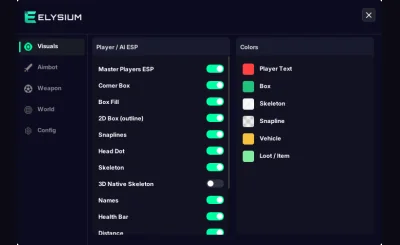
Alt-tab out of the game and press F7-F8 to inject. Go back into Rob Run and press Home to open or close the menu. Turn on the ESP parts you want on the Visuals tab, set your aim key and FOV on the Aimbot tab, then close the menu with Home again.
If the ESP unloads
If the ESP disappears during a match, open Task Manager, end cheat.exe and inject again from the game world with F7-F8. If it keeps dropping, close Discord or turn off its legacy overlay, and close the Steam, ShadowPlay, MSI Afterburner, Overwolf and Wallpaper Engine overlays. Those are the usual cause.
After you are done
Rob Run updates several times a day. If you inject from the game world and only the menu shows, the build is probably behind the latest patch. Check the status page and download the newest loader from the mega.nz folder in your setup guide, then repeat the steps above.
If you have not bought yet and want to know what to look for first, our article on what to check before buying covers the rest.