
Rob Run ESP and Wallhack on PC
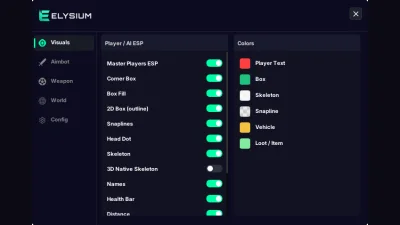
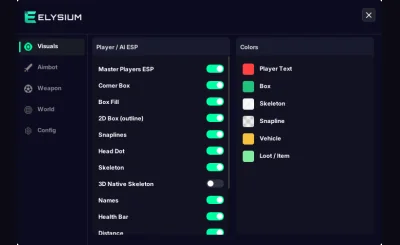
Box, skeleton, head dot, snaplines, names, health bar and distance, each with its own switch and color.
At a glance
Rob Run ESP: what the Visuals tab draws
The Visuals tab draws every player and AI in the game world through walls. Each part has its own switch and color, so you can run a full overlay or just a head dot. Tables lower on the page list every row.
6 further rows are in the feature table lower on the page.
Overview
See every crew before the job starts
What the ESP draws, which box styles you can pick, and why it only works once you are in the game world.
Start here if you want to know where everyone is. The ESP marks every player and every AI in the area with a box, a name, a health bar and a distance tag, drawn through walls and parked cars. Skeleton, 3D native skeleton and a head dot show exactly where each body is, and snaplines point at players you cannot see on screen yet.
The ESP is part of Elysium RR, the same license as the aimbot, the weapon tab and the radar. 7 days is $14.99 and 30 days is $29.99, and both plans include every ESP option.
Inject in the game world, not the lobby
The ESP reads the match you are in. If you press F7-F8 in the lobby, the menu opens but nothing gets drawn. Join a match, wait until you are standing in the game world, then inject. If the ESP drops later, close cheat.exe in Task Manager and inject again.
Box styles and body parts
Pick a corner box, a 2D outline box or a filled box. Add the skeleton or the 3D native skeleton, a head dot and snaplines. Names, health bars and distance can be turned on one by one, so a busy street stays readable. Every element has its own color on the Misc tab, and players and AI can be told apart at a glance.
StreamProof for the overlay
Turn on StreamProof and the ESP and menu stay visible to you but do not show up on OBS, Discord or screen recordings. Test it with a short local recording before you go live.
Requirements on this PC
Windows 10 or 11, 64-bit, with an Intel or AMD CPU. Rob Run on Steam, in Borderless or Windowed mode. Ultrawide monitors and 4K resolution throw the ESP out of place. Run the loader as administrator, with antivirus and Windows Defender off as the setup guide explains.
Listed rows
Every ESP element
A row names one element the Visuals tab can draw. Each one has its own switch.
- Corner box
- 2D box (outline)
- Box fill
- 3D native skeleton
- Head dot
- Snaplines
- Names
- Distance
- Players and AI
- Custom ESP colors
After checkout
Visuals tab, then setup order
Notes for the Visuals tab are on the left. Delivery and the inject order are on the right.
Menu shots
- Visuals tab
Visuals tab
Each switch on the Visuals tab turns one ESP element on or off, with its own color.
- World tab
ESP in a match
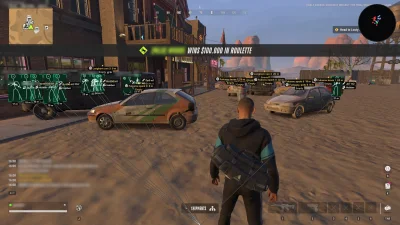
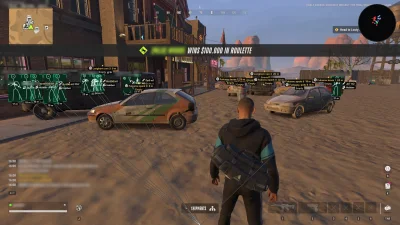
The same settings in a real Rob Run street: boxes, names, health bars and distance on every player.
More pages
Pairs well with
The other pages for the same license. Open one to see what that part of the menu does.
- Rob Run Cheats From $14.99 ESP, aimbot, no recoil, no spread, full auto, car and loot ESP, and a radar. 7 days is $14.99 and 30 days is $29.99. View details: Rob Run Cheats
- Rob Run Radar From $14.99 The Rob Run Radar page covers the World tab: car ESP, loot and bag ESP, HUD icons, and a radar with its own size and range that can rotate with your camera. View details: Rob Run Radar
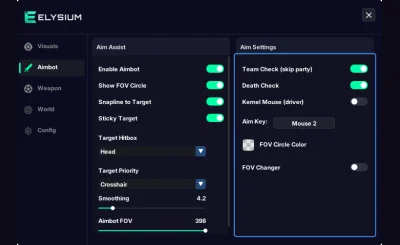
- Rob Run Aimbot From $14.99 Aimbot with aim key, FOV, smoothing, hitbox and sticky target, plus No Recoil, No Spread and Full Automatic on the Weapon tab. View details: Rob Run Aimbot
FAQ
Questions about this page
Answers for this page. The FAQ page holds the rest.
Blog
Related guides
Filter by topic to find setup guides, feature deep-dives, and update notes.
A walk through every switch on the Visuals tab, what each ESP element shows, and the settings that stay readable in busy streets.
Why a Rob Run patch can leave you with a working menu but no ESP, how often it happens, and what to do while the next build is on its way.
An honest look at account risk in Rob Run and a practical way to judge any cheat seller before you pay.
Step by step: start the loader, join a match, wait for the game world and only then press F7-F8, plus what to do when the ESP unloads.
Rob Run Q&A archive
Read the answer
Q&A: Answered questions on loader setup, ESP settings, game updates and the radar. Ask new questions on Discord.