
Rob Run Cheats for Windows
The Aimbot tab covers aim key, FOV, smoothing, hitbox and sticky target. The Weapon tab adds no recoil, no spread and full auto. Check the status page before you launch.
Rob Run Hacks: Product Overview
At a glance
Key capabilities
The short list for Rob Run Cheats, before the full feature list.
Another 9 options are in the full list below.
Overview
Rob Run cheat menu
How the five menu tabs fit a Rob Run job, from casing the street to driving off with the bag.
The Visuals tab draws every player and AI. The Aimbot tab handles aim. The Weapon tab holds no recoil, no spread and full auto. The World tab adds cars, loot bags and the radar.
The ESP prints every player and AI with box, name, health bar and distance through walls. 7 days is $14.99 and 30 days is $29.99. After a Rob Run update, check the status page before you start the game.
Each menu switch covers one option: ESP parts, aimbot, no recoil, no spread, full auto, car ESP, loot ESP, radar or StreamProof.
Configuration and support
The menu turns each option on or off and holds its own color. Press Home to open or close it. The setup guide arrives with your key, and support answers on Discord.
Plans and delivery
7 Days is $14.99 and 30 Days is $29.99. Both plans include every menu tab. Your key, the loader link and the setup guide are delivered right after checkout.
Updates and compatibility
Rob Run updates several times a day. Sometimes only the menu shows until the next build is out, so check the status page and your mega.nz folder before you launch.
Features
What's included
The full option list for Rob Run Cheats. Each line has its own switch in the menu.
- Aimbot
- Sticky target
- Aim smoothing
- Target hitbox selection
- Adjustable aimbot FOV
- ESP
- Wallhack (through walls)
- Players and AI
- Health bar
- Distance
- Snaplines
- Loot ESP
- No recoil
- Full automatic
- Custom colors for every ESP part
Experience
Menu tabs · After checkout
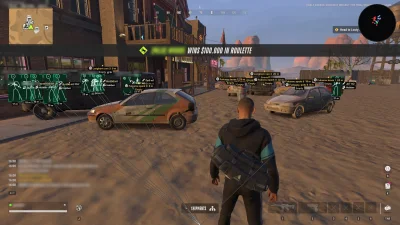
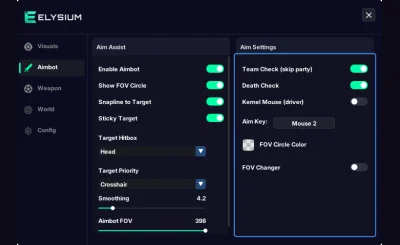
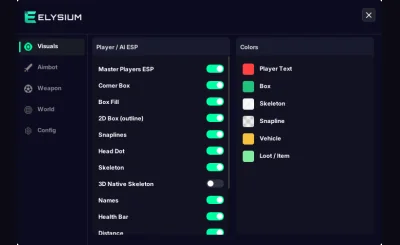
The shots above are the Rob Run menu and the ESP in a real match. The notes below say what each tab does and what you get after checkout.
In-game ESP
- Visuals tab
Match overlay
Player boxes, names, health bars and distances in a Rob Run street.
- World tab
Aimbot tab
Aim key, FOV circle, adjustable FOV, smoothing, hitbox and sticky target on the Aimbot tab.
- Weapon tab
Visuals tab
Players and AI ESP, corner box, skeleton, head dot, snaplines, names, health bar and distance.
More pages
Pairs well with
Feature pages for the same license. Each one covers one part of the menu.
- Rob Run ESP From $14.99 Every player and AI in the game world gets a box, a skeleton, a name, a health bar and a distance tag, drawn through walls. Each part has its own switch and color. View details: Rob Run ESP
- Rob Run Radar From $14.99 The Rob Run Radar page covers the World tab: car ESP, loot and bag ESP, HUD icons, and a radar with its own size and range that can rotate with your camera. View details: Rob Run Radar
- Rob Run Aimbot From $14.99 Aimbot with aim key, FOV, smoothing, hitbox and sticky target, plus No Recoil, No Spread and Full Automatic on the Weapon tab. View details: Rob Run Aimbot
FAQ
Questions about this page
Answers for this page. The FAQ page holds the rest.
Blog
Related guides
Filter by topic to find setup guides, feature deep-dives, and update notes.
A practical checklist for anyone about to buy a Rob Run cheat: PC requirements, delivery, support and what to confirm before checkout.
An honest look at account risk in Rob Run and a practical way to judge any cheat seller before you pay.
Why a Rob Run patch can leave you with a working menu but no ESP, how often it happens, and what to do while the next build is on its way.
Step by step: start the loader, join a match, wait for the game world and only then press F7-F8, plus what to do when the ESP unloads.
How StreamProof hides the menu and ESP from OBS, Discord and screen recordings, and what you should still check before going live.
A walk through every switch on the Visuals tab, what each ESP element shows, and the settings that stay readable in busy streets.
Rob Run Q&A archive
Read the answer
Q&A: Answered questions on loader setup, ESP settings, game updates and the radar. Ask new questions on Discord.
- Rob Run Q&A Does the Rob Run cheat still work after a game update? Rob Run patches often. Here is what actually changes for the cheat after an update and how to tell a broken build from a bad inject.
- Product Questions Before buying a Rob Run cheat, what should I check first? A practical pre-purchase checklist for checking what you get and the terms before spending money on a Rob Run cheat.
- Product Questions How do you compare Rob Run cheat listings without trusting "undetected" banners? Compare documentation, setup guides, support access, refund terms and update history instead of relying on a single marketing badge.
- Account & PC Questions Can a Rob Run cheat get my account flagged even when a seller says "safe"? No cheat seller can guarantee an account will never be flagged. Read the game's rules and understand the risk before you install anything.